

Technology
2 minutes
Home Automation for Energy Efficiency and Cost Savings
Smart home tech slashing energy bills one automated device at a time
View Infographic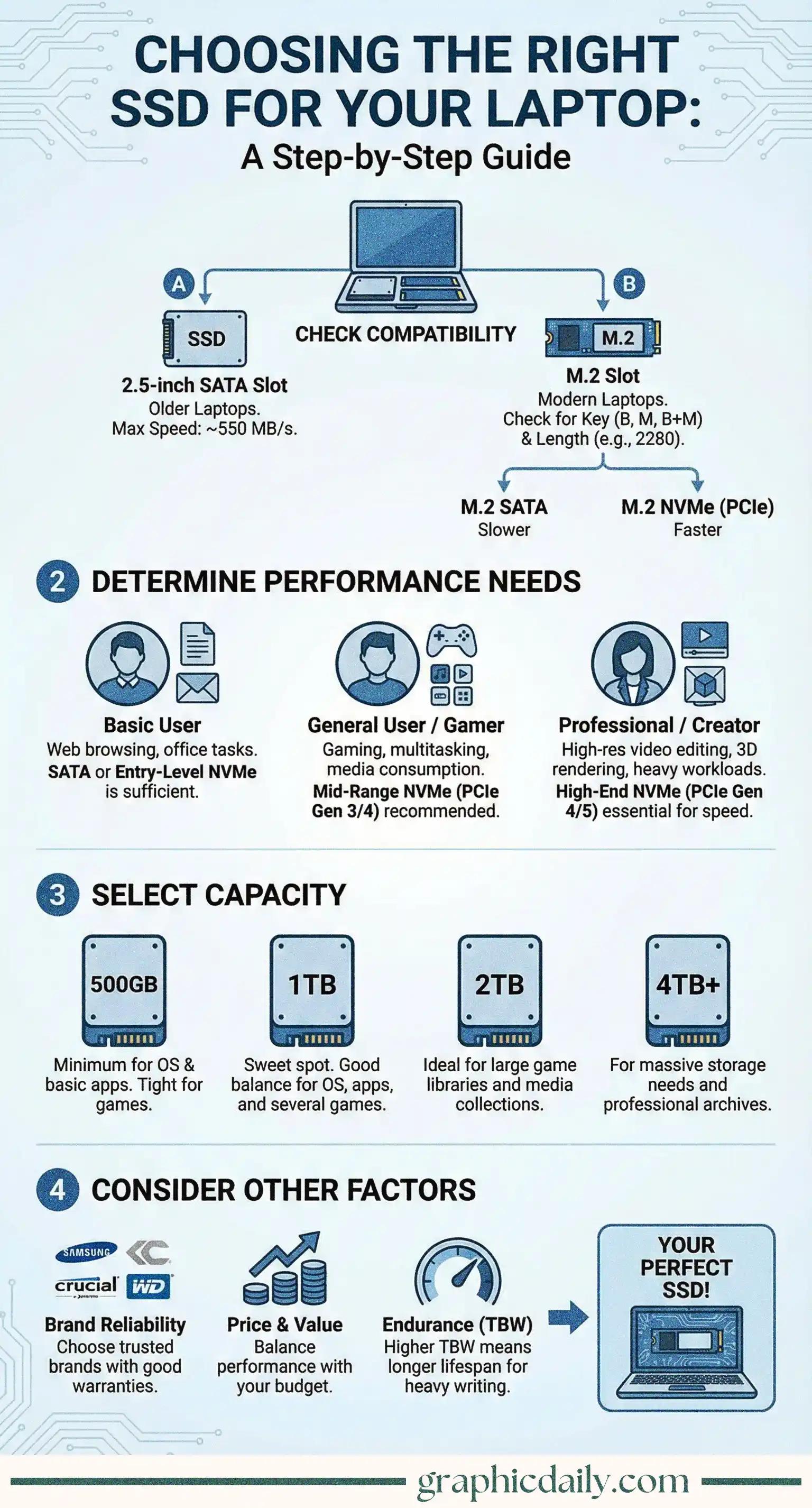
Upgrading your laptop's storage can feel overwhelming. Trust me, I've been there! But after diving into the specs and doing some research, I realized it's actually pretty straightforward once you understand the basics.
Here's the thing: not all SSDs work with every laptop. The infographic above breaks down the crucial differences between 2.5-inch SATA drives (those chunky, traditional ones maxing out around 550 MB/s) and the sleeker M.2 options that modern machines favor. If you've got a newer laptop, you're probably looking at M.2 slots, which come in two flavors—SATA (slower but cheaper) and NVMe with PCIe (blazingly fast, often hitting 3,500 MB/s or beyond). Before spending a dime, I'd recommend using Crucial's System Scanner to figure out exactly what your laptop can handle, including those mysterious "keys" and length specs like 2280.
Do you really need top-tier speed? Maybe not. Basic users doing emails and spreadsheets won't notice much difference between mid-range and premium drives, honestly. Gamers and photo editors, though? A solid NVMe drive (PCIe Gen 3 or 4) will noticeably slash load times and make multitasking smoother. And if you're rendering 4K videos or juggling massive datasets, splurging on Gen 4 or even Gen 5 becomes genuinely worthwhile—those seconds saved add up fast.
Storage fills up quick. I learned this the hard way when my 500GB drive became cramped within months! According to most tech sites, 1TB has become the sweet spot for everyday users, offering breathing room for apps, games, and files without breaking the bank. Content creators or gaming enthusiasts might want 2TB+, while 4TB? That's for folks who refuse to delete anything ever. 💾
When shopping, stick with reputable brands like Samsung, Crucial, or Western Digital—they back their products with solid warranties (typically 3-5 years per Western Digital's official specs). Our infographic above should help you weigh these factors without getting lost in technical jargon!
Sources:
Smart home tech slashing energy bills one automated device at a time
View Infographic
Battery costs dropped 90% while range tripled in 15 years
View Infographic