

Gadgets
2 minutes
Setting Up Multiple Monitors for Remote Work
Visual breakdown of optimizing your workspace with multiple displays
View Infographic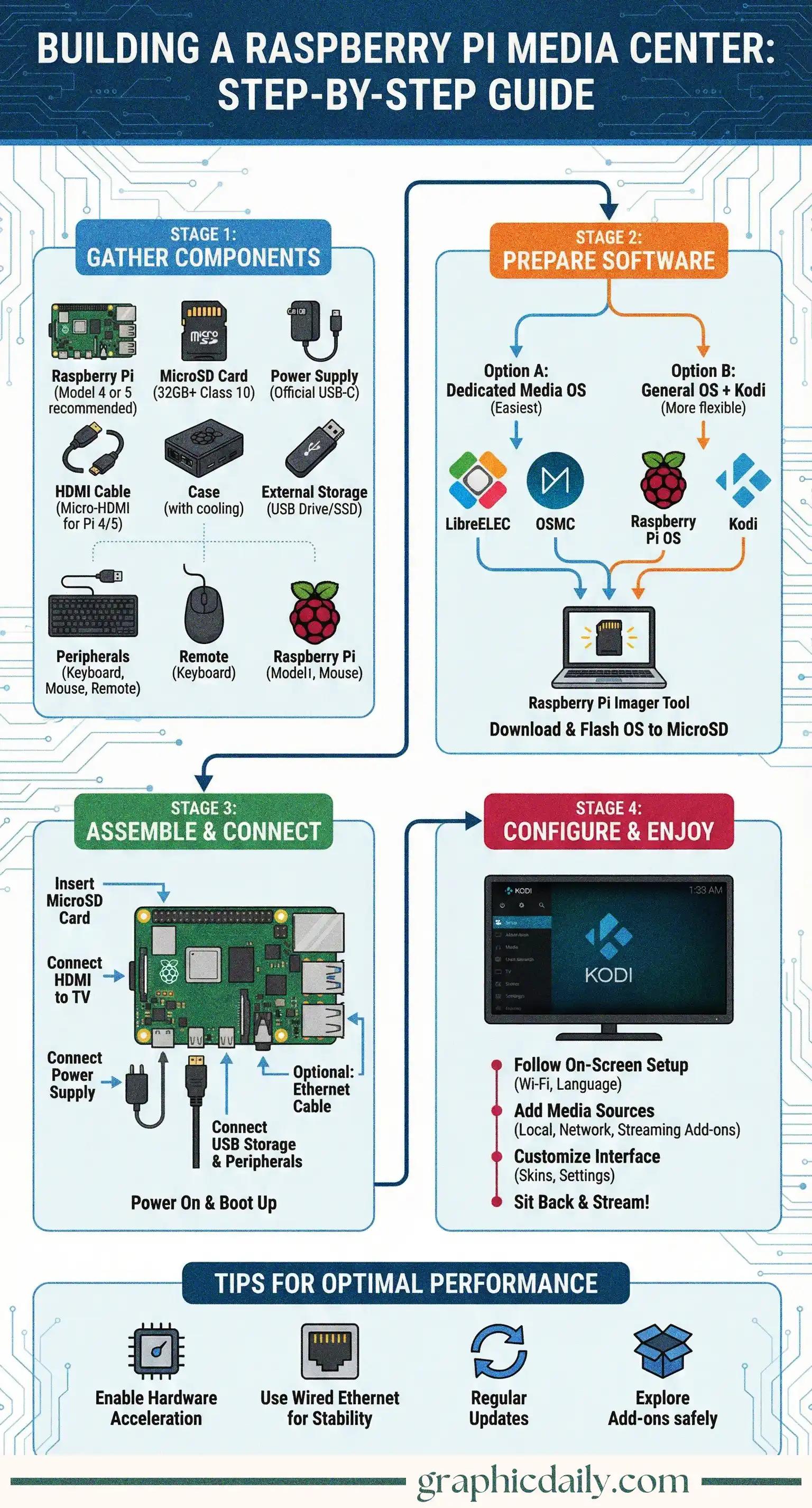
Ever wondered if you could ditch those pricey streaming boxes? Turns out, you absolutely can—and our infographic above breaks down exactly how to transform a humble Raspberry Pi into your very own media powerhouse.
Here's the thing: a Raspberry Pi 4 or 5 packs enough punch to handle high-definition video without breaking a sweat. I dove into the official Raspberry Pi documentation, and honestly, the specs are pretty impressive for such a compact device. You'll need the usual suspects—a microSD card (Class 10 minimum), proper USB-C power supply, and micro-HDMI cable—but the total cost remains shockingly reasonable compared to commercial alternatives.
The ventilation aspect is crucial here. Trust me on this one.
This is where it gets interesting, because you've got two distinct routes to consider: dedicated media systems like LibreELEC or OSMC offer streamlined, no-nonsense performance that's optimized specifically for Kodi, while installing Raspberry Pi OS gives you flexibility at the expense of some efficiency. Most folks gravitate toward the dedicated option, and after researching various forum discussions, I can see why—it's genuinely plug-and-play. 🎬
The Raspberry Pi Imager makes flashing your chosen OS ridiculously simple, eliminating most of the technical headaches that used to plague DIY projects like this.
Once you've got everything wired up (seriously, just follow the visual guide above), the initial boot sequence walks you through network setup, language preferences, and media source configuration. Here's where that external USB drive becomes essential—you'll point Kodi toward wherever your movie collection lives, whether that's local storage or a network share.
Don't skip hardware acceleration in settings. It's pivotal for smooth playback.
| Component | Recommended Spec | Why It Matters |
|---|---|---|
| Raspberry Pi | Model 4 or 5 | Handles HD video seamlessly |
| MicroSD Card | 32GB, Class 10 | Fast read speeds matter |
| Power Supply | Official USB-C | Prevents random shutdowns |
One final thought: wired Ethernet trumps Wi-Fi every single time when you're streaming high-bitrate content, so if you can run that cable, do it. Your buffer-free movie nights will thank you later!
Sources:
Visual breakdown of optimizing your workspace with multiple displays
View Infographic
Practical strategies to squeeze more juice from your laptop battery
View Infographic