

Technology
2 minutes
Home Automation for Energy Efficiency and Cost Savings
Smart home tech slashing energy bills one automated device at a time
View Infographic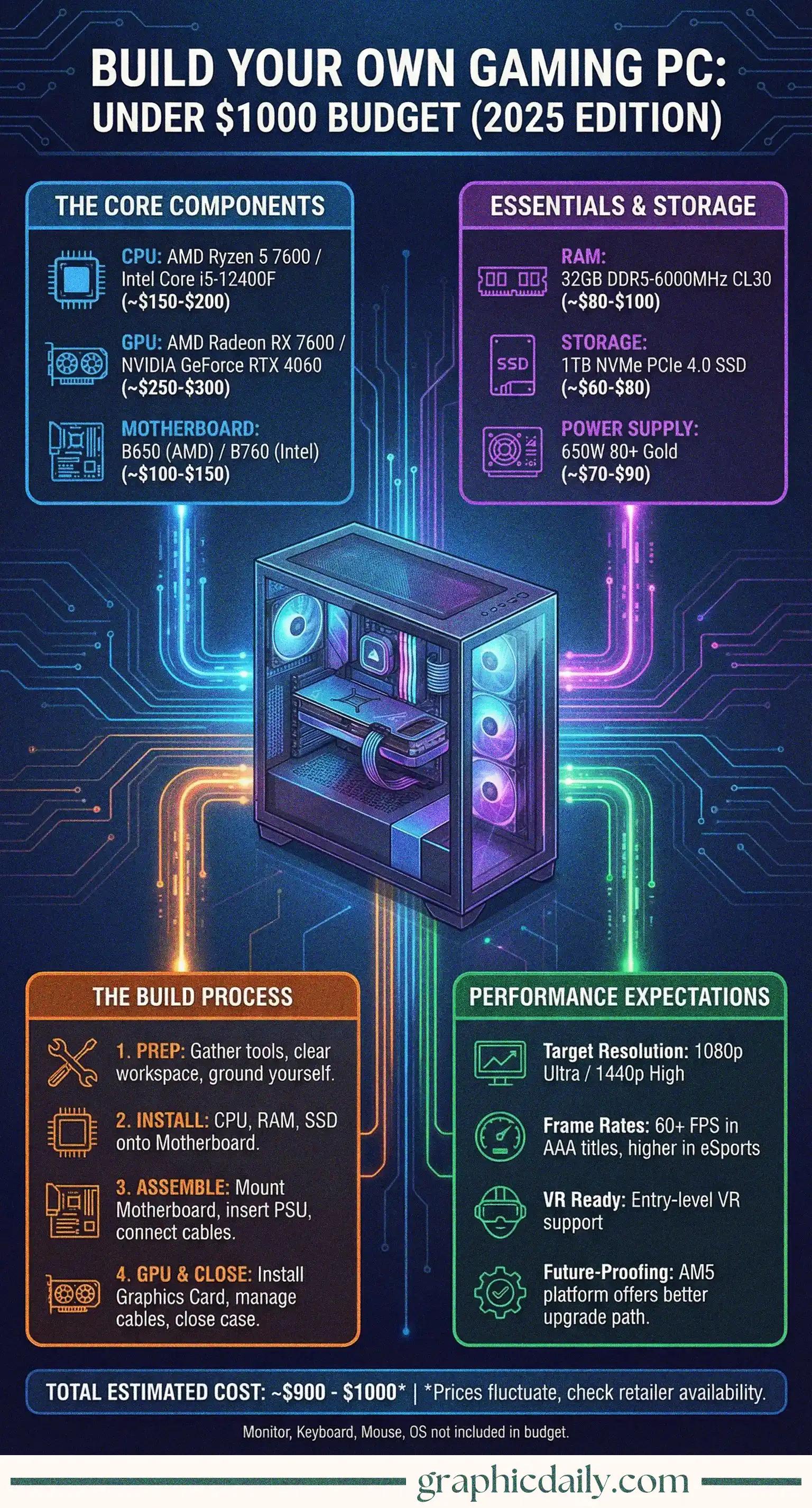
Ever wondered if you could actually build a solid gaming PC without draining your bank account? The infographic above breaks down exactly how to pull off a killer gaming rig for under a grand, and honestly, it's more achievable than I initially thought when I started digging into this.
Here's the thing about prebuilt systems: you're essentially paying for convenience. And sometimes that convenience comes with a sketchy power supply or RAM that's slower than dial-up internet. When you build your own machine, every single component gets your approval—no compromises, no mysterious budget cuts in crucial areas that manufacturers hope you won't notice.
Plus, there's something genuinely thrilling about booting up a machine you assembled with your own hands. Call it nerdy, but that first successful POST beep? Chef's kiss.
According to the specs highlighted in our infographic above, you're looking at either an AMD Ryzen 5 7600 or Intel Core i5-12400F for your processor—both absolute workhorses that won't choke on modern games. I spent way too much time on PCPartPicker comparing these, and the consensus is pretty clear: both deliver exceptional value.
For graphics, the AMD Radeon RX 7600 or NVIDIA GeForce RTX 4060 dominate the sub-$300 GPU bracket. Will they run Cyberpunk 2077 at max settings in 4K? Nope. But 1080p at high refresh rates? Absolutely crushing it.
Don't you dare skimp on the power supply, though—a quality 650W 80+ Gold rated unit from brands like Corsair or EVGA is non-negotiable, according to pretty much every build guide on Tom's Hardware. Cheap PSUs are basically ticking time bombs for your entire system. 💣
| Component | Recommended Options | Approx. Cost |
|---|---|---|
| CPU | Ryzen 5 7600 / i5-12400F | $180-220 |
| GPU | RX 7600 / RTX 4060 | $250-300 |
| RAM | 32GB DDR5-6000 | $90-120 |
| Storage | 1TB NVMe Gen 4 | $70-90 |
| Motherboard | B650 / B760 | $120-160 |
| PSU | 650W 80+ Gold | $70-90 |
| Case | Mesh airflow design | $60-80 |
Real talk? Building a PC is essentially expensive LEGO for adults. The infographic makes it look straightforward because it genuinely is—most connectors only fit one way, and modern motherboards have labeled headers everywhere. I researched assembly videos on Linus Tech Tips, and even complete beginners successfully build systems on their first attempt.
Just remember: ground yourself before touching components (static electricity is the silent killer), install your CPU and RAM before mounting the motherboard in the case, and triple-check those front panel connectors because they're finicky little things.
The whole process takes maybe 2-3 hours if you're being cautious. Then you boot it up, pray to the tech gods, and hopefully see that beautiful BIOS screen confirming everything works. That moment? Absolutely worth every anxious cable connection.
Sources:
Smart home tech slashing energy bills one automated device at a time
View Infographic
Battery costs dropped 90% while range tripled in 15 years
View Infographic